Being sick and having a ton of work to do doesn’t mix. But my body decided to give it a shot so here I am, sick and working on my final project for this course. Let’s see how this goes.
Overview of the material and concepts learned this month
This month has been the fastest and most intense month I have had in this program…so far. While it has been extremely empowering learning about motion design and how to use Adobe After Effects and Premiere Pro, the assignments were intense and required major attention. So here’s a recap of what I did this month and what I learned from the experience.
Connecting/Synthesizing/Transforming
This month has been a whirlwind between life, work and assignments, but somehow I have managed to make through unscathed…if you don’t count a fever and nasal congestion. Before my untimely brush with sickness, I was furiously working to complete assignments such as Design Challenges, creating infographics and Mastery Journal reflections. One of the assignments that stood out to me the most in regards to synthesis was creating the Kinetic Typography video. This video (featured below) was a culmination of all the research and Design challenges I completed this month. Learning about kinetic typography in our readings, I was drawn to the way someone could animate type and tell a story all in one.
“Graphic design is painting with typography” -Paul Rand (as noted in Krasner, 2013, para. 60)
Using tutorials from Adobe Help Center (n.d.) tutorials for After Effects and Premiere Pro, I began crafting my kinetic typography with a storyboard to get the general idea of the flow. From here I had to use a combination of the the After effects tutorials, YouTube tutorials from SoundDuckFilm (2019), and a Lynda.com course by Eran Stern (2016).
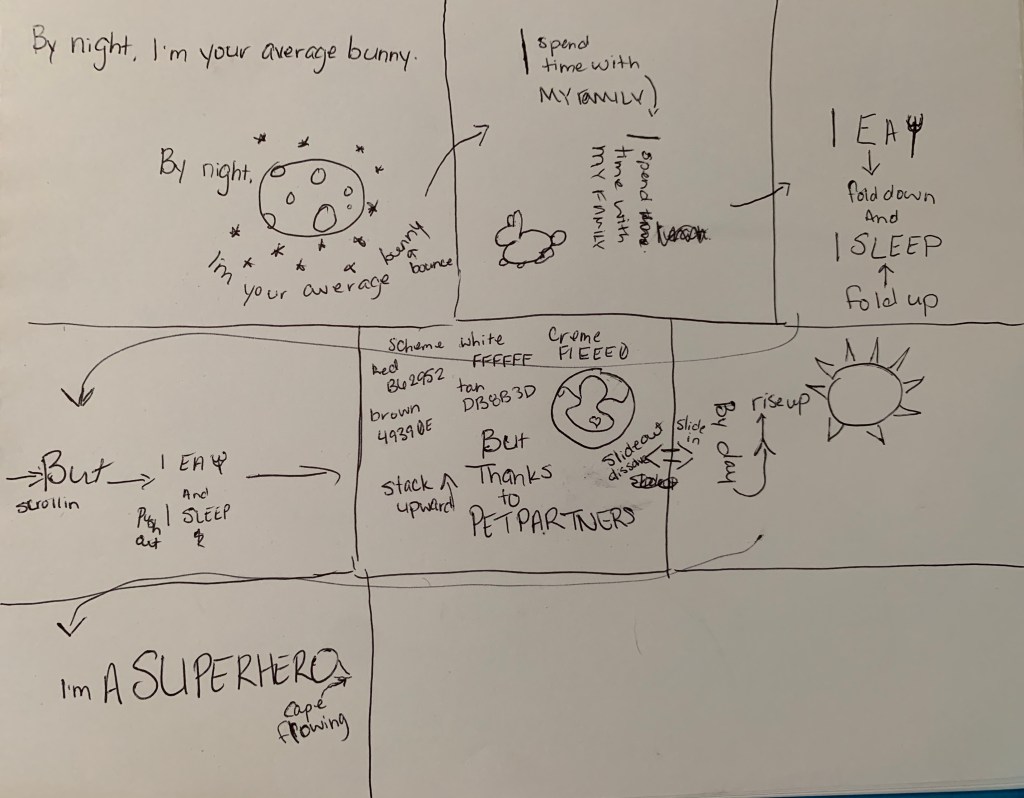
Overall, the application of all of these tutorials helped produce my first kinetic typography! It was difficult and I still need to work on my word placement and kerning, but this project would not have been anywhere near this dynamic if it were not for the research I put into the project. Through continued practice, I know I will be able to accurately transition the type in a smoother way and create even more complex transitions.
Problem Solving
Previously, I mentioned completing the Adobe Help Center (n.d.) tutorials for After Effects and Premiere Pro. These were both completed as a part of my Weekly Design Challenge assignments. Each challenge culminated in a video highlighting the techniques I learned in the tutorials and a project to put works into practice. During the Premiere Pro tutorials, I started noticing the files were not syncing up to the presenter’s screen and some of the video files would not open, altogether.
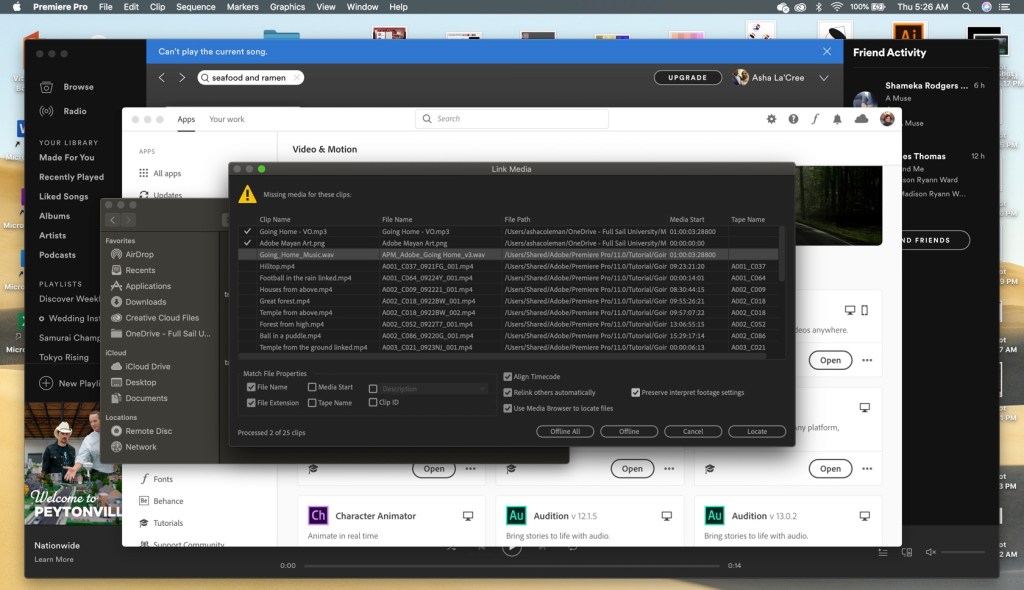
Naturally, I panicked.
Then after emailing the professor and getting a response, I got to work. The only thing that made sense was to try to insert replicated pieces of the sections that were originally supposed to be in the tutorials and when that wasn’t possible, I had to make it up. Thankfully, there weren’t many files I had to do this with. So just as I am feeling pretty good about myself and how that crisis was averted, I ran into another issue.
The file was too big!!!
I couldn’t upload them to my class portal nor could I put them on YouTube or Vimeo
So naturally, I got angry.
Then I got to work trying to figure out how to redesign the tutorial video to include all of the completed sections and make it shorter so I could upload it to any platform merciful enough to accept a video file over 500MB. First, I tried cutting down the sequences that were way too long, without cutting out the portions of the sequences that we edited for the tutorials. This was somewhat help except it still wasn’t enough. So then I tried removing the audio because maybe this makes a difference. I Apparently, it either makes no difference or just not enough because my file was still too large. In a last ditch attempt to make it work, I tried increasing the speed of longer clips to cut down on length. I’m ashamed to think it would have made a change.
With all other options exhausted, I finally did the unthinkable. I split the video into two parts.
But it worked and I was happy, so that was all.
Innovative Thinking
When dealing with innovative thinking, the project that highlighted this the most was the 30-second commercial. In addition to the horrific, two-part Premiere Pro tutorial videos, I also submitted a one-part, 30-second, coffee commercial. The visual clips were provided by our professor, but we were allowed to add to the video, if desired. For this project, I wanted to create something kind of epic and exciting rather than what I felt was the standard, cheery coffee commercial. With that in mind, I also wanted the commercial to focus on the coffee itself. I didn’t want a lot of fanfare. It was clear to me that to get the look and feel I was going for the music would have to be epic. So I chose a royalty-free song from Bensound.com, called “Evolution”. Through this song, I was able to time the video transitions accordingly and get that epic feel I was going for.
Industry-standard coffee commercial:
My version of a coffee commercial:
Acquiring Competencies
Academic
- Storytelling in design (conceptual): There is story all around us and we are drawn to stories, therefore, to draw in my audience I must incorporate story in my designs.
- Motion design (conceptual): In the beginning of the course, I had no idea how I was going to design anything with motion, but now I feel understanding motion design will inform my education and my career choice.
- Elements of story (conceptual): Understanding the moving parts of a story, such as the plot, climax, characters, etc. are all going to continue improving my work.
- Time management (technical): This month was a reminder that in all things I must maintain my schedule, whether I have to work while in school or not, I have to plan better.
Occupational
- Adobe After Effects (technical): Using After Effects will enhance my creation of content for social media platforms and future projects.
- Adobe Premier Pro (technical): Having learned to use this non-linear video editing tool will go a long way to building amazing projects such as music videos.
- Storyboarding (technical): From now on, when I have a project with any sort of story involved, I’m creating a storyboard. It really helped organize my workflow.
- Kinetic Typography (conceptual & technical): This approach to animating type and telling a story is a beautiful art form that I hope to use again in future projects.
- Infographic design (conceptual & technical): In addition to understanding the importance of the information in the infographic, I have gained the ability to make the infographic more visually stunning; which is awesome!
References:
Adobe Help Center. (n.d.). Tutorials. Retrieved from https://helpx.adobe.com/search-results.html?q=tutorials
Bensound.com. (n.d.). Evolution royalty-free music. Retrieved from https://www.bensound.com/royalty-free-music/track/evolution-epic-nature
Krasner, J. (2013). Kinetic images and typography. In J. Krasner (Ed.), Motion Graphic Design. New York City: FocalPress. Retrieved from https://learning.oreilly.com/library/view/motion-graphic-design/9780240821139/016_9780240824703_chapter7.html
SonduckFilm. (2019, December 2). 3 Kinetic typography techniques [Video file]. Retrieved from https://www.youtube.com/watch?v=UnK5lGmadSs
Stern, E. (2016, July 13). After Effects guru: Integrating type into video volume 2 [Lynda.com course]. Retrieved from https://www.linkedin.com/learning/after-effects-guru-integrating-type-into-video-volume-2/animating-titles-and-setting-timing?u=50813145


One thought on “Month 6, Week 4: Organizational Structure”